Cursor vs Windsurf (Devin Desktop) vs Zed: AI IDE Guide
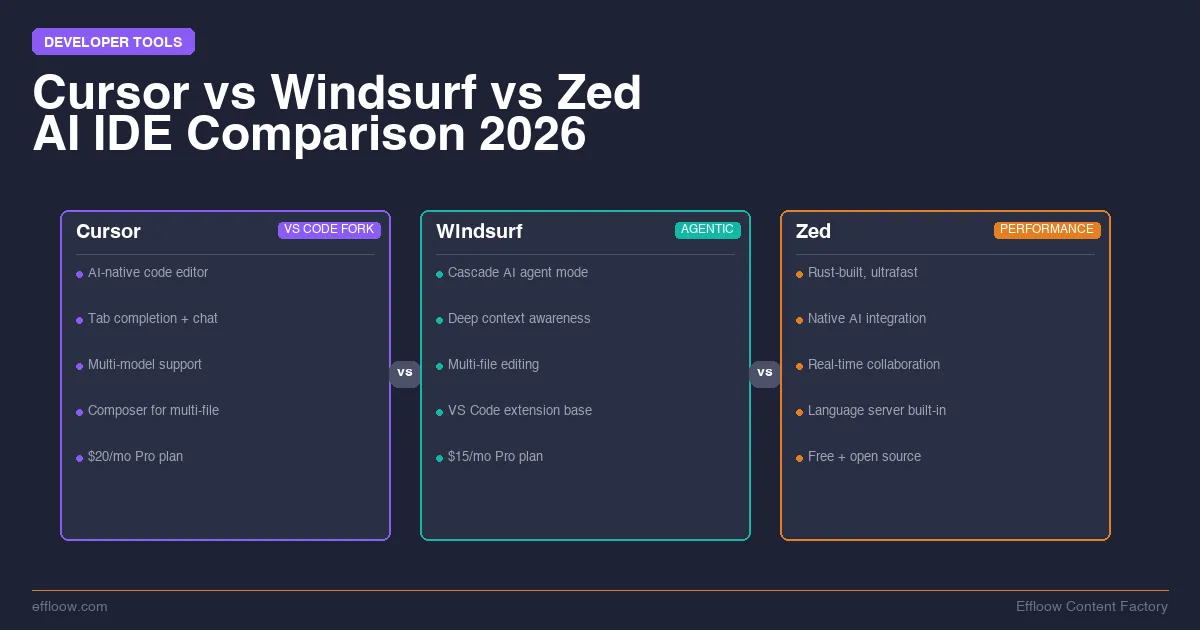
The AI IDE market has split into three clear contenders. Cursor bet everything on agent-first development. Windsurf built its own AI models to control the full stack, then got absorbed into Cognition and renamed. Zed chose raw performance and open standards.
Start with the name change, because it invalidates most of what is written about this matchup. On June 2, 2026, Cognition renamed Windsurf to Devin Desktop. The windsurf.com domain now returns a permanent redirect to devin.ai, and Cognition's own FAQ states plainly that "Devin Desktop is the new name for Windsurf." The editor did not shut down. Plans, pricing, extensions and settings carried over, and existing users were moved by an over-the-air update. But the legacy Cascade agent was retired on July 1, 2026 in favor of a Rust rewrite called Devin Local, so a 2025-era Windsurf review no longer describes the product you would install today. This guide uses "Windsurf (Devin Desktop)" throughout to keep both names findable.
Each editor wants to be the place where you spend your entire workday, and each makes real trade-offs to get there. The point of this guide is to map those trade-offs onto the way you actually work, so you finish with a pick rather than three open pricing tabs.
Every price, plan name, and capability below was checked against the vendor's own pricing page or documentation in August 2026, and the source table at the end of this guide lists exactly which page each figure came from. Where a performance number comes from a vendor's own benchmark rather than an independent test, it is flagged at the point of use.
Why AI IDEs Matter in 2026
AI-assisted coding is no longer experimental. It is the default workflow for millions of developers.
The shift happened fast. In 2024, autocomplete was the big feature. By 2025, agent mode — where the AI plans, edits multiple files, runs terminal commands, and iterates — became the standard expectation. Now in 2026, we are in the era of background agents and autonomous coding sessions that run while you sleep.
The IDE you choose shapes your entire development experience:
- Speed of iteration — how fast the AI understands your codebase and generates useful changes
- Cost efficiency — how much you pay per productive hour of AI-assisted coding
- Integration depth — whether the AI feels native or bolted on
- Workflow control — how much you can customize the AI's behavior for your specific patterns
The stakes are real. The editor decides how much of your day is spent directing an agent versus fighting the tool, and at $10–40/month the wrong pick is a small bill attached to a large daily friction cost. For projects where code is secondary to design, visual builders like Framer for design-heavy projects can complement your IDE workflow entirely.
Let's look at what each editor actually delivers.
Quick Overview: The Three Contenders
Cursor
Cursor is the AI IDE that started the category. Built as a VS Code fork, it inherits the massive VS Code extension ecosystem while layering deep AI integration on top. Cursor 3 launched on April 2, 2026, going fully "agent-first" — the entire product is built around the idea that AI agents do most of the coding while you direct and review.
Key identity: The VS Code-compatible AI powerhouse with the largest user base and the most mature agent mode.
Windsurf, now Devin Desktop
Devin Desktop is the editor formerly sold as Windsurf, and before that as Codeium. It took a different path from Cursor: build proprietary AI models designed specifically for coding. The SWE model line is trained on software engineering workflows rather than raw completion.
The agent story is what changed most. Cascade, the original agent system, was retired as the default on July 1, 2026 and replaced by Devin Local, a from-scratch Rust rewrite. Cognition now positions the product as a command center for "fleets of local and cloud agents," splitting work between Devin Local on your machine and Devin Cloud.
Key identity: The vertically integrated editor that ships its own agent and models, now sitting inside Cognition's broader Devin platform.
Zed
Zed is the performance-first editor built in Rust by the creators of Atom and Tree-sitter. It launched as a fast, minimal editor and has been steadily adding AI capabilities — but instead of building its own models, Zed embraces open standards. The Agent Client Protocol (ACP) lets you plug in an external agent and drive it from Zed's own UI; the documented list currently covers Claude, Codex, OpenCode, Copilot, Cursor, and Pi Coding Agent.
Key identity: The fast, open-source editor where you bring your own AI agent and the editor never slows you down.
The 60-Second Decision Checklist
Most readers already lean one way and just want a sanity check. Work down this list and stop at the first "yes" — it points to the editor that fits the constraint you care about most.
- Does your daily workflow depend on specific VS Code extensions (a niche debugger, a proprietary language server, a corporate toolchain)? → Cursor or Devin Desktop. Zed cannot run VS Code extensions, so this rules it out before anything else.
- Do you need US federal compliance — FedRAMP High, work in GovCloud, a single vendor for editor and models? → Devin Desktop. Cognition's compliance docs list Devin CLI and Devin Desktop as approved for FedRAMP High, with Devin and Devin Review still slated for authorization. Neither Cursor nor Zed documents an equivalent.
- Do you want to run an external agent inside the editor rather than pick a model from a dropdown? → Zed or Devin Desktop. Both are ACP hosts now, so this question no longer selects a single editor; question 5 breaks the tie.
- Do you want the most mature autonomous agent — cloud background agents, parallel sessions, a large extension ecosystem? → Cursor.
- Is the lowest monthly bill or an open-source codebase your hard requirement, and can you spare a 1–2 week keybinding adjustment? → Zed ($10/month, or free with your own API keys).
- Still tied? Default to Cursor if you are coming straight from VS Code, or Zed if a native, GPU-accelerated editor that never stutters during heavy agent runs matters more than extension breadth.
If two questions pull you toward different editors, the earlier question wins — it is the constraint that is hardest to work around later. The rest of this guide is the evidence behind each of these routes.
Pricing Comparison (checked August 2026)
Pricing is where these editors diverge, and it is also where stale comparisons do the most damage. All three vendors restructured their plans during 2026. Every figure below is taken from the plan tables the vendors publish themselves.
Cursor Pricing
Source: cursor.com/pricing and Cursor's pricing docs.
| Plan | Price | Included third-party model usage |
|---|---|---|
| Hobby | Free | Limited agent requests, Composer access |
| Pro | $20/month | $20 |
| Pro+ | $60/month | $70 |
| Ultra | $200/month | $400 |
| Teams Standard | $40/user/month | Team admin, Bugbot reviews, SSO, usage analytics |
| Teams Premium | $120/user/month | 5x Standard agent limits |
| Enterprise | Custom | Pooled usage, audit logs, dedicated support |
Note the detail that trips people up: on the paid individual tiers, the included third-party usage is worth more than the sticker price. Pro+ costs $60 and carries $70 of model usage; Ultra costs $200 and carries $400. Cursor splits spend across two pools. Its own models (Grok 4.5, Composer 2.5) come with generous included usage, while third-party frontier models bill at the model's own API price. Teams and Enterprise add a Cursor Token Rate of $0.25 per million tokens on top of that API price.
Windsurf (Devin Desktop) Pricing
Source: devin.ai/pricing. Cognition's plan table now covers the whole Devin platform rather than the editor alone, which is the single biggest practical change from the Windsurf era.
| Plan | Price | Notes |
|---|---|---|
| Free | $0 | Entry tier |
| Pro | $20/month | Individual paid tier |
| Max | $200/month | High-usage individual tier |
| Teams | $80/month + $40/full developer seat | Team billing |
| Enterprise | Custom | VPC deployment, SAML/OIDC SSO, centralized admin |
The old Windsurf "Max at $40/month" tier is gone. The tier now called Max sits at $200/month, so anyone budgeting from a pre-June 2026 comparison will be out by a factor of five. Cognition states that plans and pricing carried over for existing Windsurf accounts during the rename, so a grandfathered subscription may not match this table.
On compliance, be precise about which product you mean. Cognition's federal compliance docs list Devin CLI and Devin Desktop as approved for FedRAMP High, while Devin and Devin Review are described as "slated for FedRAMP High authorization in 2026." Devin Desktop is the editor in this comparison, so the approval does apply here — but a procurement team should read the Trust Center rather than this table.
Zed Pricing
Source: zed.dev/pricing.
| Plan | Price | What You Get |
|---|---|---|
| Personal | Free | Full editor, bring your own API keys or external agents |
| Pro | $10/month | Unlimited edit predictions, $5 of tokens included, usage-based beyond that |
| Business | $30/seat/month | Unlimited edit predictions, no bundled tokens; hosted AI at standard rates or BYOK |
Zed remains the cheapest way in, partly because it treats hosted AI as an add-on rather than the core product. The Personal tier no longer advertises a monthly allotment of free AI predictions, so treat the free plan as "a very good editor" rather than "a free AI IDE." The real cost story is unchanged: many Zed users bring their own API keys for Claude, GPT, or Gemini and bypass Zed's billing entirely.
The Real Cost Breakdown
For a solo developer doing 4–6 hours of AI-assisted coding daily:
- Cursor Pro at $20/month covers most workflows. Heavy users of third-party frontier models exhaust the included $20 and either add on-demand usage at API rates or move to Pro+.
- Devin Desktop Pro at $20/month matches Cursor at the entry paid tier. The jump above it is steep, because the next individual tier is $200.
- Zed Pro plus your own keys runs $10/month for the editor plus whatever your API usage costs. Strategic model selection makes this the cheapest of the three; defaulting to a frontier model for everything makes it the most expensive.
One caveat that applies to all three: none of these vendors bills a flat rate any more. Published prices buy you an allowance, not a ceiling, so the number that matters is your monthly token burn rather than the plan sticker. For a deeper dive on AI coding tool costs, see our AI Coding Tools Pricing Breakdown 2026.
Feature Deep-Dive
Autocomplete and Inline Suggestions
Cursor delivers tab completions that feel nearly psychic in well-structured codebases. It uses a mix of fast models for completions and frontier models for complex suggestions. Multi-line completions are where Cursor shines — it often predicts not just the next line but the next logical block of code.
Devin Desktop completions run on Cognition's own SWE model line, tuned for software engineering workflows rather than generic text prediction. Because the vendor controls both the model and the editor, completions stay fast and stay aware of what you have been editing in the current session.
Zed bills edit predictions as unlimited on the Pro plan. The free Personal tier no longer advertises a monthly prediction allowance, so budget for Pro if completions matter to you. Where Zed wins is latency, since the editor itself never stalls waiting on the renderer.
Verdict: Cursor and Devin Desktop are the two to compare on completion quality. Zed's completions are competitive but are not the reason people choose it.
Chat and Inline Editing
All three editors offer chat panels and inline editing, but the implementations differ:
Cursor integrates chat deeply with your codebase context. You can reference files, folders, and symbols directly in chat. The inline editing experience is polished — highlight code, describe what you want, and the AI rewrites it in place.
Devin Desktop carries forward the session-awareness that made Cascade distinctive: the agent tracks what you have been working on, which files are dirty, and what your recent changes look like, so you spend less time re-explaining context. Cognition rebuilt this layer as Devin Local, so the behaviour is familiar but the implementation is new.
Zed supports inline editing through its Inline Assistant and chat through the AI panel. The experience is clean and fast, but the built-in assistant carries less project context than the other two. Where Zed compensates: you can run several different agents side by side and compare their outputs.
Verdict: Devin Desktop leads for contextual conversations. Cursor's chat is the most polished. Zed's multi-agent panel is the most flexible.
Agent Mode — The Main Event
This is the feature that separates AI IDEs from code editors with AI bolted on.
Cursor Agent Mode is now the default interface in Cursor 3. Describe a feature, and the agent:
- Plans changes across multiple files
- Executes edits, creates files, runs terminal commands
- Verifies results and self-corrects when something breaks
- Runs multiple background agents in parallel on different tasks
Background Agents are Cursor's headline feature: you describe a task, the agent works in a cloud sandbox while you continue coding, and you review the diff when it finishes. You can now run agents locally, in worktrees, in the cloud, or on remote SSH.
Devin Desktop takes the most autonomous approach, and this is the part of the product that changed most in 2026:
- Multi-file reasoning with repository-scale comprehension
- Persistent memory that learns your coding patterns and preferred APIs
- Parallel sessions working on different parts of your codebase
- A split between Devin Local, running on your machine, and Devin Cloud, with both managed from one surface
- Cognition's own SWE model line, which the vendor benchmarks as substantially faster than general-purpose frontier models; those speed figures are vendor-published, not independently measured
The thing to know before you migrate a workflow: legacy Cascade was retired on July 1, 2026 and Devin Local is a from-scratch Rust rewrite rather than a renamed binary. Tutorials and prompt setups written against Cascade may not transfer cleanly.
Zed Agent Mode takes the open-standards approach:
- Native agent panel with built-in AI assistant
- Agent Client Protocol (ACP) for plugging in external agents
- Documented integrations include Claude, Codex, OpenCode, Copilot, Cursor, and Pi Coding Agent, with a fuller list in the in-editor ACP Registry
- Run multiple agents side-by-side, each with its own strengths
Zed does not try to build the best agent — it tries to be the best editor for running agents. The difference is philosophical but practical: when a better agent ships, Zed users can adopt it immediately without waiting for an editor update. If you prefer an even more hands-off approach, no-code alternatives like Bolt and Lovable skip the IDE entirely and generate full applications from natural language prompts. Google AI Studio's Antigravity agent takes the same browser-based route with Firebase wired in.
Verdict: Cursor leads for autonomous background work. Devin Desktop leads for persistent context and for teams that want the local/cloud split managed in one place. Zed leads for agent flexibility and the ability to use the best agent for each task.
MCP (Model Context Protocol) Support
MCP lets AI agents connect to external tools, databases, and services.
Cursor has deep MCP integration. Cloud agents can use MCPs you configure, and the new Automations feature triggers agents from Slack, Linear, GitHub, or PagerDuty events — all through MCP connections.
Devin Desktop ships a catalogue of MCP server integrations covering the usual team surface — Slack, Linear, Notion, Figma, Stripe, Datadog — alongside enterprise admin controls over which servers agents may reach.
Zed supports MCP natively, and because it also hosts ACP, you get two axes of extensibility: MCP for tool connections and ACP for agent connections.
Verdict: All three support MCP well. Cursor leads on automation triggers. Devin Desktop leads on breadth of prebuilt integrations and admin control. Zed leads on protocol flexibility.
Performance: Where the Architecture Shows
The performance gap here is architectural, not a matter of tuning. Cursor and Devin Desktop are both VS Code forks running on Electron. Zed is written from scratch in Rust with a custom GPU-accelerated rendering engine (GPUI).
| Property | Cursor | Windsurf (Devin Desktop) | Zed |
|---|---|---|---|
| Base technology | Electron (VS Code fork) | Electron (VS Code fork) | Native Rust (GPUI) |
| Startup profile | Electron cold start | Electron cold start | Sub-second (Zed reports ~2x faster than VS Code) |
| Memory footprint | Electron baseline | Electron baseline | Zed reports ~16x lighter on memory than VS Code |
| Rendering | DOM / Electron | DOM / Electron | GPU-accelerated |
| Large monorepo handling | Good (VS Code engine) | Good (VS Code engine) | Strong (native Rust) |
The startup and memory figures for Zed come from Zed Industries' own published comparisons against VS Code, so treat them as vendor-reported rather than independently measured. Even discounted, the direction is not in dispute: a native Rust editor with a GPU renderer carries far less overhead than an Electron shell.
What this means in practice: on a memory-constrained laptop running Docker, a dev server, and the editor at once, the Electron editors are the ones most likely to feel the squeeze during heavy agent sessions. If your machine has plenty of headroom, the difference is real but rarely a dealbreaker — it matters most on older hardware, large monorepos, or when you keep many agents running.
| Feature | Cursor | Windsurf (Devin Desktop) | Zed |
|---|---|---|---|
| Pro Price | $20/month | $20/month | $10/month |
| Agent Mode | Cloud background agents | Devin Local + Devin Cloud | ACP, multi-agent |
| Own AI Models | Yes (Grok, Composer) | Yes (SWE line) | No |
| Hosts external agents via ACP | No | Yes | Yes |
| FedRAMP High | Not documented | Devin Desktop approved | Not documented |
| Startup / Memory | Electron baseline | Electron baseline | Native Rust (Zed reports ~2x faster start, ~16x lighter than VS Code) |
| VS Code Extensions | Full compatibility | Full compatibility | Not compatible |
| Open Source | No | No | Yes (GPLv3 among repo licenses) |
| Real-Time Collaboration | Via extension | Via extension | Built-in |
Claude Code Integration
Effloow's own automation runs on Claude Code, so how each IDE hosts it is the factor we weigh most heavily. If your stack is built on a different agent, this section will matter less to you — read it for the integration model, not the verdict.
The short version: what used to be Zed's exclusive is now a two-horse race.
Cursor + Claude Code
Cursor treats Claude models as first-class options in its model selector. You can pick Claude Sonnet 4.6 or Claude Opus 4.6 for agent mode and chat. The integration is seamless because it goes through Cursor's own API layer — but that means you are paying through Cursor's credit system, not directly.
The Claude Code CLI works alongside Cursor in the terminal, but the two do not share context. You are essentially running two separate AI assistants.
Windsurf (Devin Desktop) + Claude Code
This is the answer that changed. Devin Desktop is now itself an ACP host: Cognition's product page describes working "across models and agents, powered by the Agent Client Protocol (ACP)," and lists Claude Agent alongside Devin, Codex, OpenCode, and Cascade as supported agents. Running Claude as a first-class agent inside the editor is therefore no longer something only Zed can do.
The vendor still optimizes for its own SWE models, so Claude is a supported guest rather than the default path. But if you rejected this editor in 2025 because Claude was only a dropdown entry, that objection has expired.
Zed + Claude Code
Zed reaches the same place from the opposite direction, and it got there first. Through ACP, an external agent runs as an independent process while Zed provides the UI. Zed's documentation lists Claude, Codex, OpenCode, Copilot, Cursor, and Pi Coding Agent among supported external agents, and points to an in-editor ACP Registry for the current full list.
What this means in practice:
- Claude Code appears as an agent panel alongside Zed's built-in AI
- You can run Claude Code and Zed's own agent simultaneously
- The agent gets full access to your project through Zed's file system integration
- No credit-system middleman, since you pay Anthropic directly for Claude Code usage
For more on advanced Claude Code workflows, see our guide on Claude Code subagents, commands, and multi-session patterns.
Verdict: Zed and Devin Desktop both host Claude Code natively over ACP, so this factor no longer separates them; it separates both of them from Cursor, which offers Claude as a model option rather than as an external agent. Choose between the two on price and architecture instead. Zed is the cheaper, lighter, open-source option, and Devin Desktop is the one that keeps VS Code extension compatibility and the FedRAMP High story.
Best For: Matching the IDE to Your Workflow
Solo Developers
Choose Cursor if you want the most mature agent mode with background agents and the largest extension ecosystem. You are coming from VS Code and want AI without learning a new editor.
Choose Devin Desktop if you want the most autonomous AI experience. Its session memory and flow awareness shine when you work in long, focused stretches on a single project.
Choose Zed if you value speed, work on large codebases, or prefer to bring your own AI setup (BYOK). Best value at $10/month if you already have API keys.
Teams (5–20 developers)
Choose Cursor Teams ($40/user/month) for the most mature team features, centralized billing, and the familiarity of VS Code. The extension ecosystem means your team's existing VS Code setup transfers directly.
Choose Devin Desktop Teams ($80/month plus $40 per full developer seat) if your team needs the federal compliance story or wants the AI to learn team-wide coding patterns. Price the seat maths carefully, because the base fee sits on top of per-seat billing.
Choose Zed for teams that prioritize native real-time collaboration (built into the editor, no plugin needed) and want the performance benefits of a native app across the team.
Enterprise
Choose Cursor Enterprise for pooled usage budgets, dedicated support, and maximum VS Code compatibility with existing corporate toolchains.
Choose Devin Desktop Enterprise for the strongest documented compliance story, VPC deployment, SAML/OIDC SSO, and a single vendor for both the editor and the AI models.
Zed Enterprise is newer and less proven in large organizations, but worth evaluating if performance and open-source are corporate priorities.
Open-Source Contributors
Zed is the clear winner. It is open-source, built in Rust, and its repository carried 88,322 GitHub stars when checked in August 2026 (zed-industries/zed). Licensing is split across several files rather than a single blanket licence — GPLv3 covers a substantial part of the codebase — so read the repo's licence files before you make assumptions for a commercial fork.
Cursor and Devin Desktop are both proprietary. Star counts on their public GitHub repositories measure community resources rather than editor source, which makes them a poor proxy for either project's size; that is why no star figure for them appears in this guide.
When to skip each one
Recommendations tell you what to pick; the faster filter is often what to rule out. Use this to eliminate before you compare:
- Skip Cursor if you want the lowest monthly bill, need a fully open-source editor, or your machine struggles with Electron memory use. Usage-based billing on third-party models can also surprise anyone who leans on frontier models all day.
- Skip Devin Desktop if you want a transparent open-source codebase, or if your budget breaks at the jump from the $20 tier to the $200 one. Be wary too if your team's runbooks were written against Cascade, since that agent was retired in July 2026 and Devin Local is a rewrite rather than a rename.
- Skip Zed if your daily workflow depends on specific VS Code extensions (niche debuggers, proprietary language servers), if a bundled agent's polish matters more than raw speed, or if you cannot spare a 1–2 week adjustment period to relearn keybindings.
Match this against the "Best For" picks above: the editor that survives both filters is usually your answer.
For a broader look at free options in this space, see our Free AI Coding Tools 2026 guide. And if you are working with Tailwind CSS across any of these editors, our twMerge Playground is a handy tool for testing class merge behavior without spinning up a dev server.
The Elephant in the Room: VS Code Compatibility
Cursor and Devin Desktop are both VS Code forks. This means:
- Your extensions work. Themes, language servers, debuggers, Git tools — they all transfer.
- Your keybindings work. Muscle memory carries over from VS Code.
- Settings sync from VS Code to either editor takes minutes.
- The downside: both inherit Electron's performance overhead and memory footprint.
Zed is not VS Code compatible. Switching means:
- Learning new keybindings (or configuring custom ones)
- Losing access to the VS Code extension ecosystem
- Gaining native performance, built-in collaboration, and a cleaner architecture
- An adjustment period of 1–2 weeks for most developers
This is the single biggest factor in the decision for many developers. If your workflow depends on specific VS Code extensions, Cursor or Devin Desktop are safer choices. If you are willing to adapt, Zed rewards the investment.
Summary Comparison Table
| Category | Cursor | Windsurf (Devin Desktop) | Zed |
|---|---|---|---|
| Starting price | Free (limited) | Free (limited) | Free (full editor) |
| Entry paid tier | $20/month | $20/month | $10/month |
| Next tier up | $60/month (Pro+) | $200/month (Max) | $30/seat (Business) |
| Team pricing | $40/user/month | $80/month + $40/dev seat | $30/seat/month |
| Agent mode | Cloud background agents | Devin Local + Devin Cloud | Flexible (ACP, multi-agent) |
| Own AI models | Yes (Grok, Composer) | Yes (SWE line) | No (uses third-party) |
| MCP support | Yes + automations | Yes + prebuilt integrations | Yes + ACP |
| Claude Code as native agent | No (model option) | Yes (via ACP) | Yes (via ACP) |
| FedRAMP High | Not documented | Devin Desktop approved | Not documented |
| Performance | Electron baseline | Electron baseline | Native Rust (lighter, faster start) |
| VS Code extensions | Full compatibility | Full compatibility | Not compatible |
| Open source | No | No | Yes (GPLv3 among repo licenses) |
| Real-time collaboration | Via extension | Via extension | Built-in |
| Best for | VS Code users, teams | Autonomous AI, federal/enterprise | Performance, open-source |
Final Verdict and Recommendation
There is no single "best AI IDE" — but there is a best IDE for your specific situation.
Pick Cursor if you are a VS Code user who wants the most mature agent mode available today. Cloud background agents, automation triggers, and the extension ecosystem make Cursor the safest mainstream choice, and the $20/month Pro plan covers most developers. Cursor 3's agent-first redesign shows they intend to lead this category.
Pick Windsurf, now Devin Desktop, if you want the most autonomous experience, need FedRAMP High for the editor itself, or value one vendor controlling both editor and models. It keeps VS Code extension compatibility while also hosting external agents over ACP, which is an unusual combination. Watch the pricing cliff above $20/month.
Pick Zed if you value performance, open source, or the cheapest credible path to a native Claude Code panel. Zed's memory and startup advantages over Electron are real, though the specific multiples are vendor-published rather than independently measured. At $10/month, or free with your own API keys, it is also the cheapest. The trade-off is unchanged: no VS Code extensions, and a plugin ecosystem that is smaller even as it grows.
There is no single best AI IDE. Cursor is the safest mainstream choice for VS Code users who want the most mature agent mode. Windsurf, now Devin Desktop, is the pick for autonomous coding and for teams that need FedRAMP High. Zed wins on performance, open source, and price. The old tiebreaker no longer works: Zed and Devin Desktop both host Claude Code natively over ACP, so if your workflow is built around Claude Code, decide on cost and architecture rather than on integration depth.
Our disclosed bias
Effloow's content and automation pipeline is built on Claude Code, which pulls us toward editors that host it natively rather than as one model option among many. That lens used to point straight at Zed. It now points at Zed and Devin Desktop equally, which is a useful reminder that a bias can survive after the fact that justified it has moved. Treat our read as a lens rather than a neutral ranking: a team standardized on Cognition's SWE models or on Cursor's background agents would reasonably reach a different verdict from the same sources. The point of naming the bias is so you can discount for it.
Where Each Figure Came From
Comparison guides age badly, and the usual reason is that nobody can tell which claims were checked and when. This table maps every load-bearing figure in this guide to the page it came from, so you can re-verify any single row without re-reading the article.
| Claim in this guide | Primary source | Checked |
|---|---|---|
| Cursor plan names and prices | cursor.com/pricing | Aug 2026 |
| Cursor included-usage amounts, token rate | cursor.com/docs/account/pricing | Aug 2026 |
| Windsurf renamed to Devin Desktop | devin.ai/desktop FAQ | Aug 2026 |
| Devin plan names and prices | devin.ai/pricing | Aug 2026 |
| Devin Desktop ACP + agent list | devin.ai/desktop | Aug 2026 |
| FedRAMP High status by product | docs.devin.ai/federal/compliance | Aug 2026 |
| Zed plan names and prices | zed.dev/pricing | Aug 2026 |
| Zed supported external agents | Zed external agents docs | Aug 2026 |
| Zed star count and licensing | zed-industries/zed | Aug 2026 |
Two figures in this guide are deliberately not in that table, because no primary source supports them at the precision they are usually quoted at. Zed's "~2x faster startup" and "~16x lighter memory" are the vendor's own comparisons against VS Code, and the SWE model speed multiples are Cognition's own benchmarks. Both are reported here as vendor claims and neither is used to decide a verdict.
What Effloow Added
Each editor's own site sells that editor. None tells you which one fits how you actually work, and none tells you that a competitor changed its name four months ago. The added value here is the cross-tool decision with the sources attached:
- A source table mapping every price and capability claim to the vendor page it came from, with a check date, so you can audit a single row instead of trusting the whole guide.
- The rename, handled properly. Windsurf became Devin Desktop in June 2026 and Cascade was retired that July. Comparisons that still describe "Windsurf Max at $40/month" are off by a factor of five on a tier that now costs $200.
- A correction to the received wisdom on ACP. Native Claude Code hosting was Zed's differentiator; Devin Desktop now does it too, which changes the recommendation for anyone who picked an editor on that basis.
- A 60-second decision checklist that routes you to one editor from a handful of yes/no questions, before you read a single feature table.
- A vendor-versus-independent flag on every performance number, so Zed's memory and startup advantages read as the manufacturer claims they are.
Even a fully sourced comparison can only narrow the field. It cannot prove which editor survives your team's real repos, build times, and review load — that takes a measured run on your own stack. If you build a developer tool and want that kind of head-to-head evidence executed and published, that is what Effloow Proof Studio does.
Related Reading
- AI Coding Tools Pricing Breakdown 2026: Build a Stack for $30/Month
- OpenAI Codex vs Claude Code: Which AI Coding Agent Wins?
- Terminal AI Coding Agents Compared 2026: Claude Code vs Codex CLI vs Gemini CLI vs Aider
- AWS Kiro: Spec-Driven Development IDE
- AI Model Comparison Tool — Interactive comparison of Claude, GPT, Gemini, and Llama models
- Vibe Coding Tool Picker — Find the right AI coding platform for your workflow
Get the next one
in your inbox.
One short weekly dispatch with new guides, tools, and what we tested. No spam, unsubscribe anytime.
Get weekly AI tool reviews & automation tips
Join our newsletter. No spam, unsubscribe anytime.
More in Articles
Source-verified guide to Claude Code, Codex CLI, Gemini CLI, and Aider for terminal-based AI coding workflows in June 2026.
Source-verified 2026 guide to CodeRabbit, Claude Code Review, Qodo, and GitHub Copilot code review without unsupported hands-on claims.
Compare GitHub Codespaces, Gitpod, and CodeSandbox for cloud development. Pricing, features, performance, and which to choose in 2026.
We installed Google Antigravity 2.0 in our lab and put its Agent Manager and browser-driving agents through a scripted battery of real repo tasks, including a browser-driven E2E test. Here is what worked, what broke, and whether it justifies a seat.
Tools you can use
Compare AI models side-by-side: pricing, context windows, multimodal support, and speed. Interactive matrix for Claude, GPT, Gemini, Llama, and more.
Interactive quiz to find the best vibe coding tool for your project. Compare Cursor, Lovable, Bolt.new, Replit, v0, and Windsurf on pricing and features.