Llama 4 Maverick: 400B MoE Model — Self-Hosting and API Guide
Why Llama 4 Maverick Matters
In April 2025, Meta shipped the Llama 4 family and reset what open-weight models can do. Llama 4 Maverick — the mid-tier model in the three-model lineup (Scout, Maverick, Behemoth) — packs 400 billion total parameters into a mixture-of-experts design that only activates 17 billion at inference time. That combination delivers near-frontier multimodal performance at a fraction of the compute cost compared to running a dense 400B model.
What makes Maverick uniquely interesting for infrastructure teams: the weights are free. You can run it inside your own VPC, own the full data pipeline, and still get a model that beats GPT-4o and Gemini 2.0 Flash on most multimodal benchmarks. For teams that cannot send data to a third-party API — finance, healthcare, defense — Maverick is the strongest open-weight option available.
This guide covers everything you need to put Maverick into production: the architecture, the real hardware costs, step-by-step vLLM setup, which managed API to pick if you don't want to self-host, and how benchmarks stack up against proprietary alternatives.
The Architecture: MoE in Practice
Mixture of Experts — the active parameter trick
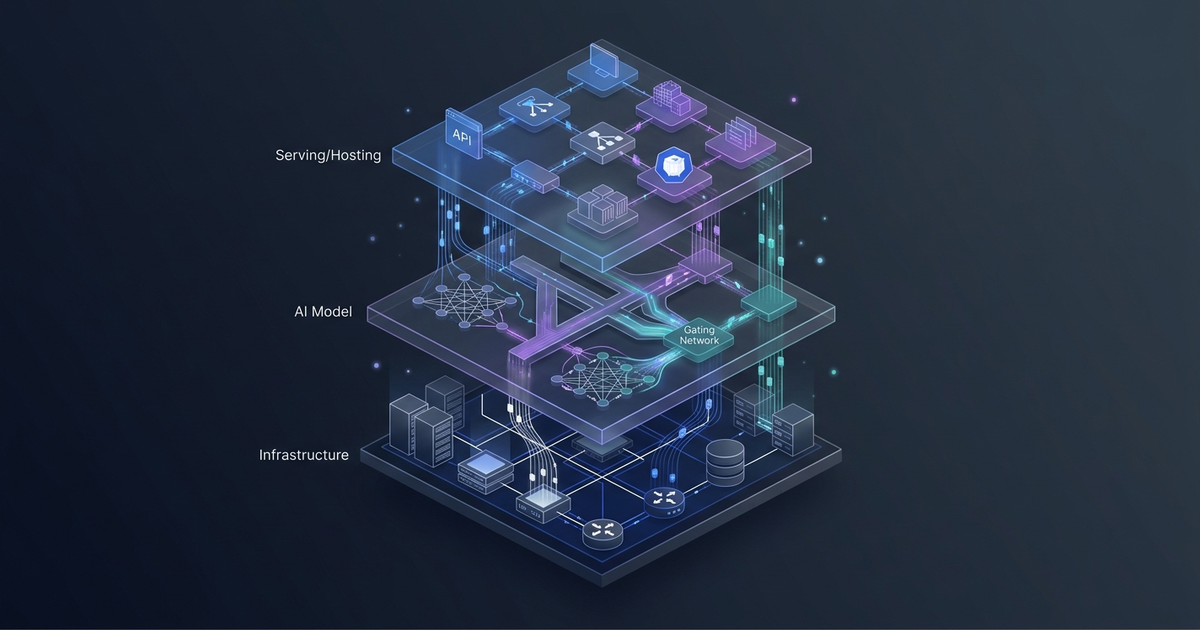
Llama 4 Maverick uses an alternating dense and MoE layer architecture. In every MoE layer, each token activates:
- One shared expert (always active)
- One of 128 routed experts (selected per token by a learned router)
The router is a small linear layer that picks which expert processes each token. At inference time, only around 17 billion of the 400 billion parameters do actual computation. The remaining ~383B parameters sit in VRAM, cold.
This creates the central hardware trade-off: you pay in memory for all 400B parameters, but you pay in compute only for 17B. For batch inference with large batches, this is a significant throughput advantage. For latency-sensitive, small-batch workloads, the advantage shrinks because you still need all weights loaded.
Early fusion multimodality
Unlike previous Llama releases that handled vision through a separate projection head bolted onto the text model, Llama 4 uses early fusion: image patches and text tokens are encoded into the same embedding space from the first transformer layer. There is no separate visual encoder like a CLIP tower. The practical effect is more natural interleaving of visual and textual reasoning — the model can reference specific image regions mid-sentence rather than treating vision as a separate step.
Context window: Maverick vs Scout
A common point of confusion: Maverick supports up to 1 million tokens. Scout — the smaller sibling with 16 experts instead of 128 — is the one that reaches 10 million tokens. The trade-off is quality: Maverick's 128-expert depth produces significantly stronger scores on reasoning and coding benchmarks. For most production workloads under 500K tokens, Maverick is the right pick. If you genuinely need multi-million-token context, Scout is the tool.
In practice, hardware determines how close to Maverick's 1M ceiling you can operate:
- 8× H100 80GB (BF16): approximately 430K tokens
- 8× H200 141GB (BF16): full 1M tokens
Hardware Requirements
Self-hosting Maverick is not a single-GPU affair. Here are the real numbers:
| Format | VRAM Required | Minimum Hardware |
|---|---|---|
| BF16 (full precision) | ~800 GB total | 8× H100 80GB or 10× A100 80GB |
| FP8 quantized | ~400 GB total | 4× H100 80GB or 4× H200 |
| INT4 quantized | ~200 GB total | 2× H200 or 8× A40 48GB |
Important: VRAM requirements above cover model weights only. Add 20–50% headroom for the KV cache at production context lengths.
For most teams, FP8 Maverick on 4× H100 80GB is the practical entry point. Benchmark quality versus BF16 on your specific use case before committing — FP8 typically shows near-identical MMLU and HumanEval scores with roughly half the memory cost.
On cloud hardware, an 8× H100 node (AWS p4de.24xlarge) runs approximately $32/hour on-demand. FP8 on 4× H100s cuts that by half. If you expect sustained load, reserved instances reduce the effective rate to $12–16/hour.
Self-Hosting with vLLM
vLLM v0.8.3 introduced full Llama 4 Maverick support, including FP8 quantization and multimodal inputs.
Step 1: Install vLLM
pip install "vllm>=0.8.3"
Step 2: Download weights from Hugging Face
Accept Meta's Llama 4 Community License at huggingface.co before downloading:
huggingface-cli login
huggingface-cli download meta-llama/Llama-4-Maverick-17B-128E-Instruct \
  --local-dir ./llama4-maverick
Step 3: Launch the inference server
BF16 on 8× H100:
vllm serve meta-llama/Llama-4-Maverick-17B-128E-Instruct \
  --tensor-parallel-size 8 \
  --max-model-len 400000 \
  --dtype bfloat16 \
  --trust-remote-code
FP8 on 4× H100 (recommended starting point):
vllm serve meta-llama/Llama-4-Maverick-17B-128E-Instruct \
  --tensor-parallel-size 4 \
  --max-model-len 200000 \
  --dtype fp8 \
  --quantization fp8 \
  --trust-remote-code
--trust-remote-code is required. Maverick's MoE routing uses custom code that vLLM cannot load without it.
Step 4: Test with the OpenAI-compatible endpoint
vLLM exposes a /v1/chat/completions endpoint. Any library built for the OpenAI SDK works without changes:
from openai import OpenAI

client = OpenAI(
    base_url="http://localhost:8000/v1",
    api_key="none"
)

response = client.chat.completions.create(
    model="meta-llama/Llama-4-Maverick-17B-128E-Instruct",
    messages=[
        {"role": "user", "content": "Explain MoE routing in under 100 words."}
    ],
    max_tokens=200
)

print(response.choices[0].message.content)
Multimodal requests
Pass image URLs alongside text in the content array — no separate endpoint needed:
response = client.chat.completions.create(
    model="meta-llama/Llama-4-Maverick-17B-128E-Instruct",
    messages=[
        {
            "role": "user",
            "content": [
                {
                    "type": "image_url",
                    "image_url": {"url": "https://example.com/architecture-diagram.png"}
                },
                {
                    "type": "text",
                    "text": "What components does this architecture diagram show?"
                }
            ]
        }
    ]
)
Early fusion means the model handles interleaved text and images in a single pass with no additional latency overhead from a separate vision model.
API Providers (No Self-Hosting Required)
If 8× H100s are not in your budget, four managed providers offer production Maverick access:
| Provider | Input (per M tokens) | Output (per M tokens) | Max Context | Best For |
|---|---|---|---|---|
| Groq | $0.50 | $0.77 | 128K | Lowest latency, dev/test |
| Fireworks AI | $0.22 | $0.88 | 1M | Production, full context |
| Together AI | $0.27 | $0.85 | 1M | Inference + fine-tuning |
| OpenRouter | $0.15 | $0.60 | 1M | Cost-optimized routing |
Groq uses LPU inference hardware that delivers near-instant token generation for short responses. The 128K context cap is the main constraint — workloads requiring long context need a different provider.
Fireworks AI was among the first to serve Maverick (minutes after Meta published the weights) and has a well-tested production configuration. Full 1M context, competitive pricing, strong reliability track record.
Together AI is the best pick if you plan to fine-tune Maverick later. They offer both inference and fine-tuning on the same platform, so you keep the full model lifecycle in one place.
OpenRouter routes requests dynamically to the cheapest available backend. Lowest floor price, but you sacrifice control over which provider handles each request.
All four expose OpenAI-compatible endpoints. Change base_url and api_key and your existing code runs without modification.
Benchmarks
Meta released Llama 4 Maverick on April 5, 2025. Here are the official benchmark scores from Meta's release announcement (0-shot, temperature=0, no majority voting):
| Benchmark | Llama 4 Maverick | Notes |
|---|---|---|
| MMLU Pro | 80.5 | Knowledge reasoning |
| GPQA Diamond | 69.8 | Graduate-level science |
| HumanEval | 82.4% | Code generation |
| DocVQA (test) | 94.4 | Document understanding |
| ChartQA | 90.0 | Chart comprehension |
| MMMU | 73.4 | Multimodal understanding |
| Multilingual MMLU | 84.6 | 12-language coverage |
At launch, Maverick outperformed GPT-4o and Gemini 2.0 Flash on the multimodal benchmarks (DocVQA, ChartQA, MMMU) while scoring comparably to DeepSeek V3 on coding. In 2026, newer frontier models (GPT-5.4, Gemini 3.1 Pro) have raised the ceiling on reasoning benchmarks, but Maverick's multimodal document understanding scores remain competitive with commercial APIs.
The comparison that matters for most cost-conscious teams: at $0.50/$0.77 on Groq, Maverick delivers strong multimodal capability at 9–23x lower per-token cost than comparable proprietary alternatives. If your workload is document processing, visual analysis, or multilingual generation rather than cutting-edge math competitions, Maverick's price-performance ratio is difficult to match with any closed-source model.
Common Mistakes
Loading all weights onto one GPU: 400B parameters never fit a single GPU at any practical precision. Always specify --tensor-parallel-size matching your GPU count.
Confusing Maverick and Scout context windows: Scout reaches 10 million tokens; Maverick reaches 1 million. If you need to ingest multi-million-token codebases, use Scout. For most production workloads under 500K tokens, Maverick's stronger reasoning quality wins.
Skipping FP8 without benchmarking: FP8 Maverick on 4× H100 80GB achieves near-identical MMLU and HumanEval scores versus BF16 for most tasks. Defaulting to BF16 without checking doubles your hardware cost.
Underestimating KV cache memory: A 400K token context in BF16 requires roughly 160GB of KV cache alone, on top of model weights. Budget VRAM with KV cache included, not just model size.
Omitting --trust-remote-code: Maverick's custom routing code will not load without this flag. The server silently fails model initialization if you forget it.
FAQ
Q: Does Llama 4 Maverick support function calling?
Yes. The Instruct variant was trained with tool use. The format mirrors the OpenAI function calling spec — pass a tools array in the chat completion request. Groq, Fireworks AI, and Together AI all support it in their Maverick deployments.
Q: What's the practical difference between Llama 4 Scout and Maverick?
Scout has 16 experts (Maverick has 128), a 10M token context window (Maverick has 1M), and runs on a single H100 80GB node. Maverick scores 4–8% higher on reasoning and coding benchmarks. Use Scout when context length is the bottleneck; use Maverick when quality is.
Q: Can I fine-tune Llama 4 Maverick?
Yes, under the Llama 4 Community License. Fine-tuning with LoRA at FP8 requires at least 4× H100 80GB. Together AI and Fireworks AI both offer managed fine-tuning pipelines. A full fine-tune on a 50K sample dataset typically takes 3–7 days on that configuration.
Q: Is Llama 4 Maverick production-ready in 2026?
Yes. Fireworks AI reports Maverick as one of their five most-requested models. Multiple organizations are running it in production. The main operational concern is node-level failure: if one H100 in an 8-GPU setup fails, the full model instance goes down. Plan for multi-node redundancy if you have uptime SLA requirements.
Q: How does Maverick perform on long-context tasks?
At 1M token context, retrieval quality degrades noticeably past ~400K tokens on needle-in-a-haystack benchmarks. For RAG workloads, semantic retrieval to a 200K or smaller context window still outperforms stuffing 800K raw tokens into the model. Use full 1M context for tasks where the model needs to reason across the entire corpus, not for general production RAG.
Key Takeaways
- Architecture: 400B total / 17B active parameters, 128 experts, alternating dense and MoE layers. Early fusion handles text and images in a single model.
- Context window: 1M tokens for Maverick (Scout is the 10M variant).
- Hardware floor: 4× H100 80GB at FP8, 8× H100 80GB at BF16. Multi-GPU is mandatory.
- vLLM setup: v0.8.3 or later,
--tensor-parallel-size,--trust-remote-coderequired. - Managed APIs: Groq for speed, Fireworks and Together for full 1M context, OpenRouter for lowest cost.
- Benchmark position: Beats GPT-4o on multimodal document tasks; slightly behind on pure math and coding. 9–23x cheaper per token on managed APIs.
Llama 4 Maverick is the strongest open-weight multimodal model available and the only practical choice for teams that need frontier-class performance with full data ownership. The 4× H100 FP8 entry point is real infrastructure investment, but it buys you a model that beats GPT-4o on document understanding at a fraction of the API cost. If self-hosting is off the table, Fireworks AI or Groq give you managed access at 9–23x lower per-token pricing than comparable proprietary models.
Prefer a deep-dive walkthrough? Watch the full video on YouTube.
Need content like this
for your blog?
We run AI-powered technical blogs. Start with a free 3-article pilot.